
Features
Mirror Flex Forms
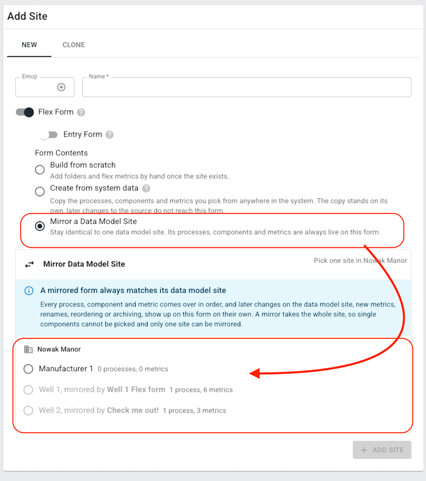
Users can now streamline management of their data sites and flex forms by linking them together. Once a flex form is linked to a particular data site any changes made to the data site will automatically be reflected on the flex form, saving the need for any double configuration work.
There are two ways to activate the linkage.
- When Creating a new flex form: You can choose an existing data site. This Automatically populates the new flex form and links the two together.
- When editing an existing Flex form: You can choose to link it to a data model site. Be aware that this will replace the configuration of your existing flex form.
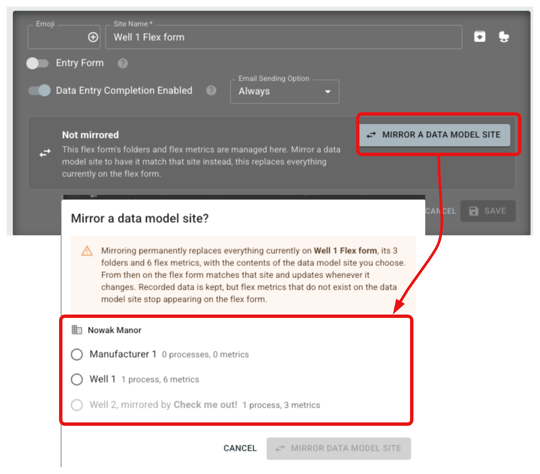
Once a flex form is linked to a data model site, any changes made to the site will automatically be reflected on the the flex form.
Restore archived sites
Supervisors can now find archived sites at the bottom of the site list by turning on Edit Mode and Show Archived. Select a site and confirm to restore it, along with the items archived with it. Items archived separately stay archived.
Enhancements
- More consistent Flex Form completion - Hidden source metrics no longer leave required entries behind in Flex Forms, and Required checkboxes stay in sync with saved settings.
- Metric changes stay in sync - Data Entry refreshes site information after you save metric edits, helping the page reflect your latest changes.
Keep those ideas coming!
As always, we are grateful for all of our water and wastewater superheroes that we get to work with every day. We hope you enjoy the new features, but as always, we welcome your suggestions, comments, and complaints. The future of Waterly is driven by your input, so please keep the feedback coming by support ticket, phone call, email, or carrier pigeon.