
You may have noticed some things are changing…
First off, for users that regularly use Waterly Rounds “Entry” flex forms (most of our industrial water doctors/treaters fall in this category) to complete inspections, reviewing and marking and Entry form “complete” has moved a bit. When you need to mark the entry form as complete and/or generate a service report, you’ll need to click the REVIEW button on the new summary panel. See below.
.png?width=670&height=114&name=image%20(6).png)
You’ll then be presented with a Flex Form or Entry Summary screen, where you will be able to review all out of range metrics in one spot (metrics that are within ideal range will not be shown on this screen). See below: -1.png?width=619&height=255&name=image%20(7)-1.png)
The Site/Entry Summary panel combines site completion (if configured) with something new: An indication of which metrics are out of range.
Why is this here?
This is prep-work for a bigger change that will be coming soon where you will have the ability to have multiple ranges for each metric, including the ability to:
- Set up Multiple Ranges for any number based metric
- Flag metrics that have regulatory limits to summarize them
- Summarize compliance or other ranges for metrics across an entire system, region, or organization.
The new Summary panel is a spot where you will be able to review all out of range metrics for that Site or Form, both regulatory and things that are just outside of an ideal range. Waterly will be deploying and a new set of tools that will let you configure multiple ranges that have the following key capabilities:
- Define the “Ideal Range”: The new multi-range tool will first automatically migrate your existing min and max ranges (if enabled) for each numeric metric to an “ideal range.” All existing limits will be preserved. This new Ideal range will be the “Green” range. You’ll then get to define other ranges below.
-
Add Multiple Ranges: Create multiple ranges beyond your defined ideal range with different limits determining the boundaries. Create different colors associated with the limits to quickly see metrics that are in a cautionary range, high warning range, or just not idea. Call and color them what you like. Your sparklines in Data Entry will then color history bars or dots that are out of range according to their range color.
- Flag Regulatory Limits: For municipal water systems, you might want to mark a limit as a regulatory threshold (usually an MCL or permitted number). Regulatory limits will be summarized separately across sites, systems, regions, and organizations, giving our water quality professionals a better view into regulatory status while allowing operators to operate and manage their own sets of limits, if desired. Regulatory limits will both summarize and show differently in the Site Summary review, as well as dashboards.
See below for a video that summarizes how Multi-Range will work:
After ranges are configured, all users will be able to see that values are falling outside of the ideal range and which limits they fall outside of. See the example video showing the resultant view:
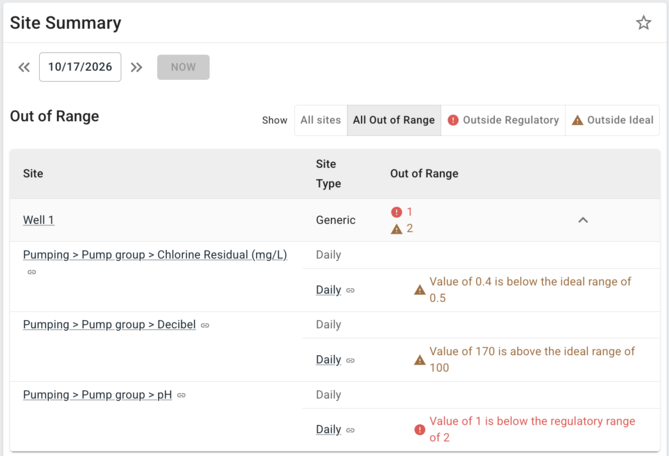
The Site Summary dashboard will also show non-ideal ranges differently:
Learning more:
We know that this is a shift from how things work now and may create some additional questions. In order to help prepare you for any transition planning we will be doing the following:
- Hosting Office Hours Session for demo and Q&A (click to register)
- Provide more detailed documentation
- Taking any questions or ideas by reaching out directly to us.
Where to Next?
Rounds’ ability to tell the difference between operational and regulatory limits is just the beginning. Here are a couple other ideas we're working through related to this:
- Adjusting ranges automatically for seasonal permit changes
- Visually flagging different ranges on reports
- Custom notifications and actions based on ranges
Please note that the shape and timing of future releases is subject to change.
If you have any ideas or feedback please also feel free to book a time with Mike, our Head of Product.
At the end of the day we're building the best solution together.