
What is a Constant?
A Constant is a named value in Waterly that is used in calculations such as chemical costs, concentrations, volume/mass conversions, and water management/loss.
Constants can be shared across Organizations or individual Systems and can be assigned effective dates, allowing their values to change over time without having to modify the formulas that use them. They are available to be created and edited with proper permissions on either your Organization or System Settings pages.
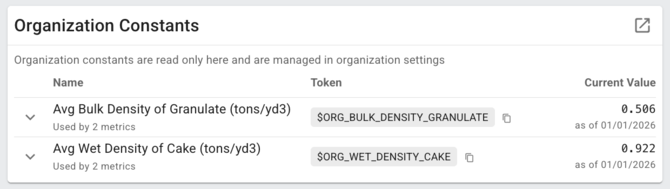
Constants have two features that unlock value beyond just using Waterly Rounds calculations.
- They are editable by Supervisors or higher:
Constants can easily be created and edited and updated by Supervisors or higher without any need to update downstream calculations (you will still need to contact Waterly support for creating and updating downstream calculations). - They are time aware: Constants have effective date ranges which allows calculations to be much more sophisticated. This means that a calculation will always use the correct value based on the date range and that historical data will reflect this time aware data (e.g. your chemical cost for orthophosphate was probably different in 2024 than in 2026.)
Some Use Cases for Constants:
- Chemical costs and budgets: Chemical prices change periodically. Enter each unit price with its effective date, and every cost calculation uses the price that was in effect that day, so a price increase doesn’t rewrite last year’s spend. Or add the annual chemical budget as a constant, and year-to-date spend vs budget tracks itself. Example: polymer goes from $1.85 to $2.10/lb on July 1. Costs before July stay at the old price, and the budget check shows you’re on pace to overspend by October.
- Operational targets: Wastewater treatment targets like SRT, MLSS/MLVSS, DO, or cake solids change seasonally. Store your treatment or operational targets as constants, and calculations and charts compare actual against the target in effect at the time. Each change, with its date and reason, becomes part of the record.
- Wastewater Example: raise the target SRT from 8 to 12 days for winter nitrification. Wasting targets update automatically on the effective date, and the trend shows how quickly the process caught up.
- Water Example: You have a site specific energy (electrical efficiency) target of 1,100 kWh/MGal but after your forthcoming SCADA upgrade, the engineer tells you that you should be able to hit 900 kWh/MGal, so effective your commissioning date, you want the operational specific energy (efficiency) target to improve.
- Measured factors: Values like biosolids densities and water loss factors are measured periodically, not fixed. Update each one when it changes, with a note on its source, and everything that depends on it follows.
- Wastewater Example: a new density test changes the factor that converts biosolids tons to the cubic yards reported to the state.
- Water management example: Your community never used to track meter accuracy by measuring, so while you used to assume 1.25%, you recently measured a sample set of meters and you now know it is closer to 1.5% because you measure and update it each time.
- Local limits and ordinance values: Pretreatment local limits, surcharge thresholds, and other ordinance values apply across many permits or users. Store each number once, update it when the ordinance changes, and every calculation that uses it stays consistent.
- Example: the city lowers its local zinc limit. Update the zinc limit constant, and every industrial user’s compliance calculation uses the new limit from its effective date.
- Water Loss: Many of the factors that go into driving water loss calculations can be stored as constants. For instance total annual capital expense and total annual operating expense (among others!) can all be stored as yearly values so that Rounds can calculate a water loss specific to that year or month…or even days.
Next Steps:
Consider registering for one of our upcoming webinars where we walk you through how these work (click to register):
Waterly’s operators and engineers would love to help you explore getting constants set up for your operation - let's talk!